Can You Schedule Posts on TikTok? Full 2026 Guide

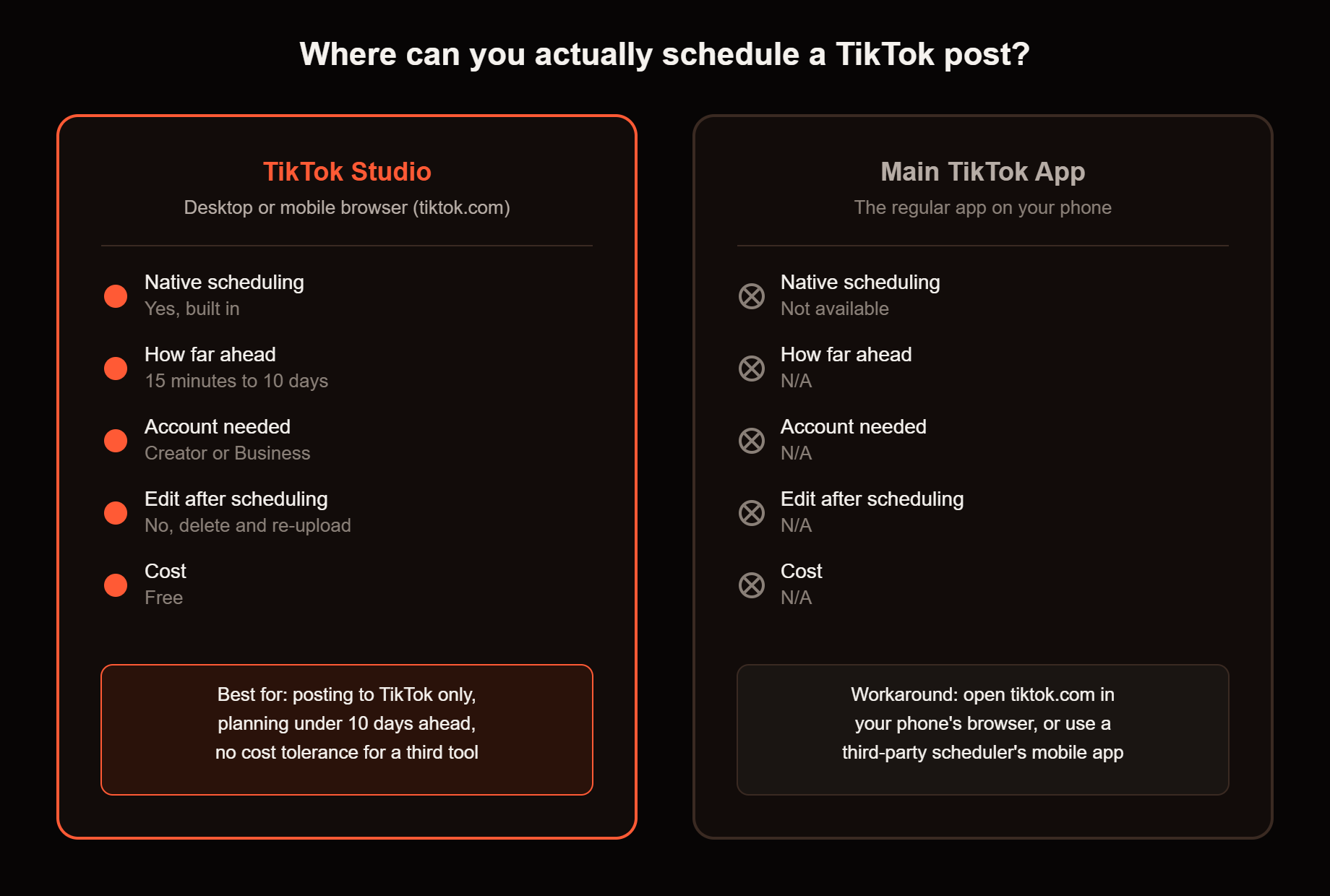
Yes, you can schedule TikTok posts, but only through TikTok Studio on desktop or a mobile browser, not the main TikTok app. Native scheduling covers anywhere from 15 minutes to 10 days ahead and requires a Creator or Business account. If you need to plan further out than that, you will need a third-party scheduling tool.
Updated August 2026
Posting consistently matters more on TikTok than almost any other platform, but sitting at your phone every day to hit a good window is not realistic for most people. Scheduling solves that, once you know exactly what TikTok actually allows.
TikTok's native scheduling limits at a glance
Here is exactly what TikTok allows right now, before you pick a method.
| TikTok Studio (desktop or mobile browser) | Main TikTok app | Third-party schedulers | |
|---|---|---|---|
| How far ahead | 15 minutes to 10 days | Not available | Weeks to months, depending on the tool |
| Account type required | Creator or Business | N/A | Usually Creator or Business, connected through TikTok's official API |
| Can you edit after scheduling | No, delete and re-upload | N/A | Varies by tool, some allow edits until publish |
| Cost | Free | N/A | Free tiers available, paid plans for higher volume |
Yes, TikTok lets you schedule posts, here is how it actually works
TikTok added native scheduling through a tool called TikTok Studio. You upload your video, toggle on "Schedule video," and pick a date and time up to 10 days out. Once scheduled, the post is not visible anywhere, not on your profile, not in your drafts, until it publishes automatically at the exact time you set.
If you want to plan out a full week or month of content before you ever open TikTok Studio, Handler's TikTok Posting Schedule Generator can help you map out a cadence first, so you already know what is going up and when.
How to schedule from desktop
- Go to tiktok.com and log in.
- Click Upload in the top right and add your finished video.
- Write your caption, add hashtags, choose your cover image, and set privacy options.
- Toggle on "Schedule video" and pick your date and time.
- Confirm. The post is now locked in and will publish automatically.
Keep this in mind: once a post is scheduled, nothing about it is editable. Change your mind about the caption, the cover, or the video itself, and you have to delete the scheduled post and start over from upload. If a video ends up not posting the way you expected even after all this, [Why Won't My TikTok Post? 9 Fixes That Work (2026)] covers the most common causes.
Can you schedule from the TikTok app on your phone?
Not directly. The main TikTok app does not have a built-in scheduling button as of 2026. To schedule from your phone, open tiktok.com in your phone's browser and use the same TikTok Studio interface, or use a third-party scheduling tool that has its own dedicated mobile app. If you only ever post from your phone, this is the single biggest practical limitation of TikTok's native scheduler.
Does scheduling hurt your reach?
No. A scheduled post is treated the same as one you publish manually the moment it goes live. TikTok's algorithm does not know or care whether a human tapped "post" or a scheduler did it for them. The only thing that affects reach is the content itself and when it lands relative to your audience being online, not the mechanism used to publish it.
The hard limits, in plain terms
- Native scheduling tops out at 10 days. Want to batch a full month of content in one sitting? Native scheduling alone will not get you there.
- You need a Creator or Business account. Personal accounts do not see the scheduling option at all. Switching is free, under Settings and Privacy, then Account.
- Nothing is editable once scheduled. Treat scheduling as the very last step, not a place to keep tweaking a caption.
- The minimum lead time is 15 minutes. You cannot schedule something for right now, only slightly in the future.
When a third-party scheduler is worth it
If you post to TikTok alone, rarely plan more than a week out, and do not mind deleting and re-uploading to fix a mistake, native scheduling through TikTok Studio is enough on its own. If you are batching content further ahead, cross-posting the same video to Instagram Reels or YouTube Shorts, or managing more than one account, a third-party scheduler removes the 10-day ceiling and usually lets you edit right up until the post goes live.
Pick based on how far ahead you actually plan, not on how many features a tool advertises. And whichever method you use, timing still matters as much as scheduling itself. Handler's Best Time to Post on TikTok tool can help you pick a slot worth locking in.
Quick answers
Can you schedule TikTok posts from your phone? Not through the main TikTok app, it has no built-in scheduling option. You can schedule from your phone by opening tiktok.com in a mobile browser, or by using a third-party scheduling tool with its own app.
Can you edit a TikTok post after scheduling it? No. Once a post is scheduled through TikTok Studio, the caption, cover, video, and time are all locked. To make a change, you have to delete the scheduled post and upload it again.
Do you need a Business account to schedule TikTok posts? Yes, for native scheduling. Personal accounts do not see the scheduling option in TikTok Studio. Switching to a Creator or Business account is free and takes under a minute in Settings and Privacy, then Account.
Can you schedule TikTok posts more than 10 days in advance? Not with TikTok's native scheduler, it caps out at 10 days. To plan further ahead, you will need a third-party scheduling tool, most of which allow weeks or months of lead time.
Before you build your next batch
Once your schedule is actually running, the next question is what to put in it. If you want a shortcut for picking ideas worth scheduling in the first place, see how we approach that in [The VSC Framework: How We Validate TikTok Ideas Before Building].