
Kill, Mutate or Scale: How to Read Your Finance App TikToks
Judge each finance TikTok against your own account's baseline, then act. Kill posts that stay near baseline with weak saves and shares.

Short answer
Judge each finance TikTok against your own account's baseline, then act. Kill posts that stay near baseline with weak saves and shares. Mutate posts that do well on one signal but not the other. Scale posts that beat baseline on both. Before you scale anything, re-run the claim check.
Key points
- Kill, Mutate and Scale are three per-post decisions: drop it, tweak it, or double down.
- Handler's outlier calculator says there is "no standard cutoff" for what counts as an outlier, and to pick one and keep it the same. This post gives a frame in the same spirit, not a fixed rule.
- Judge a post only after it has finished its run. The calculator's by-hand guide skips videos under 10,000 views or under two days old.
- In finance, every mutation and every scale step gets the claim check again. Scoring a post does not clear it.
- The worked example uses four public finance posts, not anyone's results.
What do Kill, Mutate and Scale mean?
They are the three calls you can make on any post once it has run: drop it, tweak it, or double down. In Handler's loop they sit after research and generation. TikSpy finds the winners, DupeFarm rebuilds them with your AI creator, and ReDupe is where you iterate.
- Kill means stop making that format. Keep a note of why, so you do not rebuild it by accident.
- Mutate means change the post and try again. ReDupe re-spins a post: swap the creator, tweak it, or try a new take.
- Scale means make more posts in the shape that worked.
Each call is per post, not per format.
What do you measure on your own finance posts?
Three things, in this order.
- Outlier against your own baseline. Divide the post's views by your typical views. Handler's calculator defines typical as the median, not the average, of your last 10 to 30 posts. Its bolts run from 1 bolt under 5x, to 3 bolts at 10x to 100x, to 5 bolts at 200x and up. [CONFIRM: whether Handler shows these scores for your own posts, or whether you compute them by hand with the calculator.]
- Pull. This is how hard the post moved viewers to share, save and comment, with saves and shares weighted most. It is the quality gate. A post can reach many people and still move none of them.
- The claim check. Pass or fail, separate from the scores. A post that fails is not a Scale candidate, however well it scored.
Then wait. Handler's by-hand guide for the Outlier Score says to skip videos under 10,000 views or under two days old, because they have not finished their run. If your account rarely reaches 10,000 views, set your own floor and keep it the same for every post.
How do you decide?
Line up the three measures and read across. This table is our reading of the scores, not a rule built into Handler.
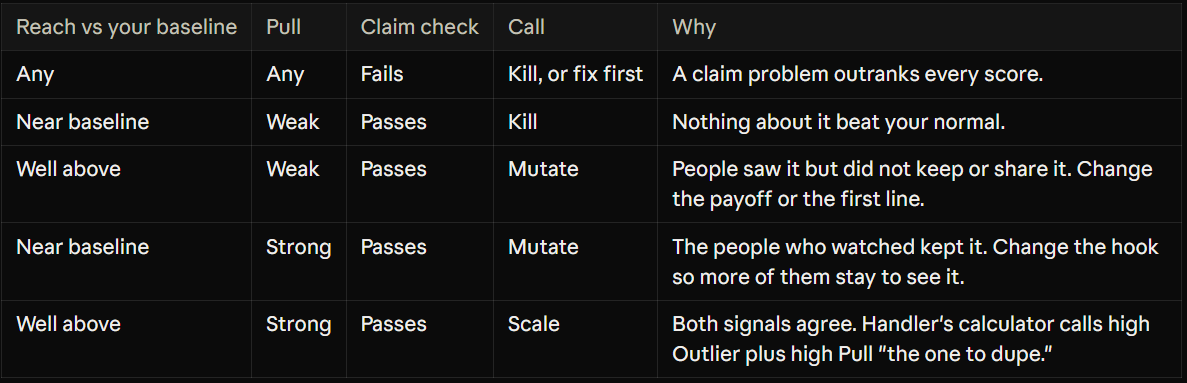
"Near" and "well above" are yours to set. For a reference point, Handler's calculator calls anything under 5x "around normal for the account" and 5x "a solid outlier." Pick your lines, write them down and keep them the same for every post, or you will be comparing your mood, not your posts.
What does it look like on real finance posts?
This is an illustration, not a result. We scored the four public finance posts from our last article as if each were your own, using the figures on Handler's public pages as of 3 Nov 2026. They belong to other accounts, so the calls below are a demonstration of the frame, not advice about those posts.
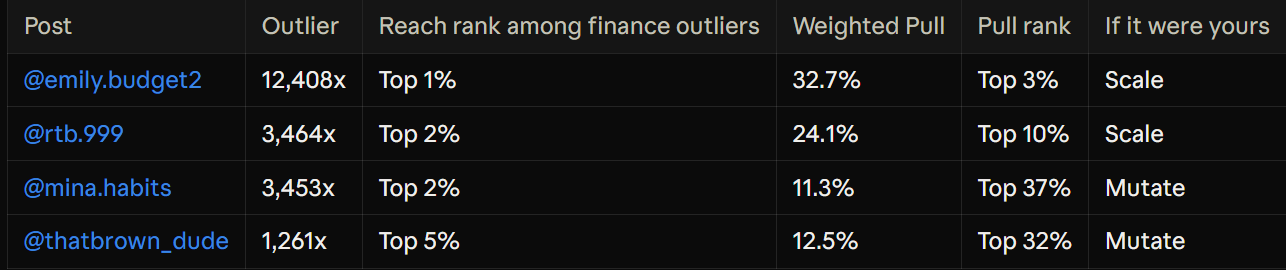
The first two (@emily.budget2, @rtb.999) beat their baselines by a wide margin and sit near the top on Pull, so both signals agree: Scale. The other two also beat their baselines by a wide margin, but their Pull is weaker. All four score 5 out of 5 on Pull, yet @mina.habits has the lowest weighted figure of the four. We would Mutate those two: keep the reach, then change the payoff to give viewers a reason to save or share.
Two caveats. First, all four are outliers by selection, so none of them is a Kill. A Kill looks like a post that lands near your baseline with few saves and shares. Second, a pass on Handler's description is not a claim check. @mina.habits shows a savings figure, so that one would need its number checked before any Scale.
What do you change when you mutate a finance post?
Change one thing, so you know what moved. In ReDupe you can swap the creator, tweak the post or try a new take. Match the change to the weak signal:
- Reach was weak, Pull was strong. Change the hook line or the first seconds, so more viewers stay long enough to see what was good.
- Reach was strong, Pull was weak. Change the payoff, the last beat or the caption, so the post gives viewers something worth saving or sending on.
- Neither is clear. Swap the AI creator or try a new take on the same situation.
Three habits keep mutation honest:
- Log every change. Write down the post, the one change and the result, using the same measures and the same wait before you judge.
- Re-run the claim check on every new line. A new overlay or caption can add a promise the original never made. The checklist is in "How Finance Apps Grow on TikTok Without Risky Claims".
- Set a limit. Decide in advance how many mutations a shape gets before it becomes a Kill, and write that number down.
How do you scale without scaling risk?
Scaling means more posts in the shape that worked. In finance, more posts also means more chances for a risky line to slip through, so scale the shape and not the claim.
- Vary the situation, not the promise. The shape that worked is a recognizable money moment in one short shot. Make new moments in that shape.
- Read the comments first. If viewers ask what the app does, or question a figure on screen, fix that before you make more.
- Ask your reviewer to approve a template. Agree the allowed wording for overlays and captions once, then check each new post against it.
- Keep the caption line. Use "General information only, not financial advice." on every post, in the wording your reviewer approves.
- Keep labeling AI creator videos as AI-generated.
- Do not repeat a joke figure as a result. A number that is clearly a joke in one post can read as a claim when it appears ten times.
Then go back to the top of the loop. Scale a shape, measure the new posts against your baseline and decide again.
What this does not cover
- It is not legal or financial advice and does not replace a compliance review. Rules differ by country, app type and licence.
- It is a decision frame, not a built-in Handler rule. The thresholds and the wait are yours to set.
- It does not predict views. Handler's calculator notes the score does not predict future views.
- The worked example uses other accounts' posts as an illustration. It shows no results from anyone's finance app.
- It covers budgeting, savings and payments style posts. Trading, investing, lending and crypto apps need a closer look.
- It does not cover paid ads. TikTok has a separate Financial Services ad policy.
Find your own finance winners
Drop your app link into Handler and your first 6 picks are free, no card. You get the outlier TikToks winning in your niche, each scored, with TikSpy's read on the hook and payoff. See plans and pricing for the paid tiers.