How a TikTok Dupe Works in Handler, Start to Finish
A dupe is a winning TikTok rebuilt as your own on-brand video. You keep what worked, which is the setting, the framing and the beats, and you swap in your AI creator and your app. Nothing is reposted: the video is a new render.
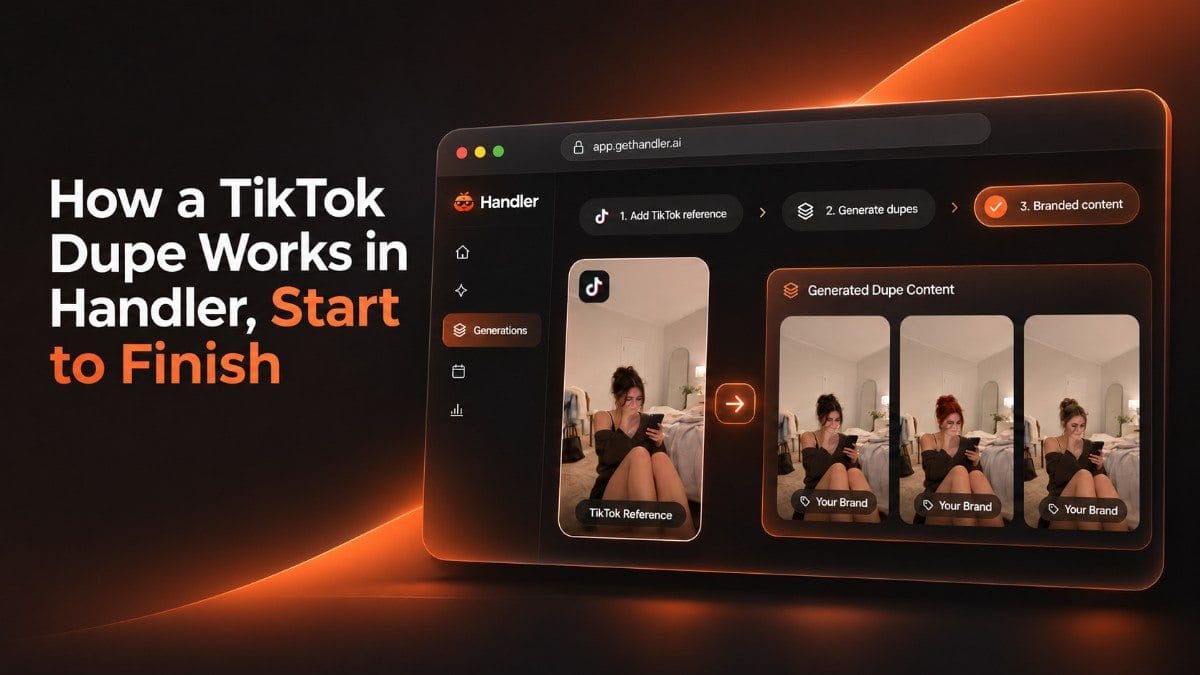
A dupe is a winning TikTok rebuilt as your own post. In Handler you pick an outlier, pick your AI creator, choose Motion Dupe or Premium Dupe, set the trim and render. You get a finished clip plus an overlay kit of text and captions to add in TikTok. Below is one real run.
Key points
- You make four choices: which winner, which AI creator, which style and which section to copy. The overlay text is the fifth, and it is yours to edit.
- Our run turned a Health & Fitness outlier that beat its account's usual views by 239x into a 5-second Motion Dupe for an app-blocking app.
- The overlay kit came back with three angles (hook, POV and curiosity), each with a text overlay and a caption.
- Label AI creator videos as AI-generated when you post them.
What is a dupe?
A dupe is a winning TikTok rebuilt as your own on-brand video. You keep what worked, which is the setting, the framing and the beats, and you swap in your AI creator and your app. Nothing is reposted: the video is a new render.
Handler offers two styles. A Motion Dupe copies the exact motion of the source clip. A Premium Dupe is a fresh take on the format, with optional sound. A third piece, the overlay kit, supplies the text and captions you add in TikTok.
It always starts from an outlier, a post that beat its own account's usual views, scored by Outlier and Pull. If those terms are new, start with What Counts as a Winning TikTok for a Mobile Game?.
What do you need before you start?
- A brand. Your app, set up in Handler from an App Store link, a Play Store link or your site.
- A winner. Pick one in TikSpy, from Daily Picks, Browse All or Your Library.
- An AI creator. Use one of your own or a preset. To make a new one, the creator page says you can seed it from a reference photo, a few traits or a line of text, then pick one of six samples. Only use a face you have the right to use.
- A paid plan. The creator page says kits, creators and renders are paid. The free plan gives you your first 6 picks, no card.
- Credits. Renders are billed per second of video. See plans and pricing for how credits work on each tier.
What happens step by step?
Here is one real run on 12 Nov 2026, from winner to finished clip. The screens are shown after the steps.
- Pick the winner. We chose a Health & Fitness outlier, an app demo tagged Gamified Step Tracker. It had 378K views against about 1.6K typical for the account, which is 239x, and a Pull of 5 out of 5 (12.8% weighted). Saves and shares are weighted most in Pull. The post opens on a walking selfie, then cuts to a step-tracking game.
- Open Dupe this. The button sits under the source video on its research page.
- Pick your AI creator. The picker lists your creators, a New creator option, and the presets. We chose Laura, one of our own.
- Choose the style. The two cards read "Motion Dupe, copies the exact motion" and "Premium Dupe, a fresh take on the format + optional sound". We chose Motion Dupe.
- Check the options. Natural skin finish and Keep original sound were switched on. Trim the source was optional. Background and Outfit stayed on Keep original.
- Trim the source. Handler set the trim to 0.0 to 5.0 seconds with the note "You're clearly in frame until 0:05". For a Motion Dupe you pick 3 to 30 seconds, and renders bill whole seconds. We accepted the suggestion and confirmed.
- Wait for the render. The output card moved through Queued, Swapping in your creator, Rendering and Finishing. It said "usually 2-5 min" and offered "Cancel - full refund". We did not time the render.
- Review the clip. The viewer showed Laura in a 5-second Motion Dupe, in the same street and with the same movement as the source.
- Take the overlay kit. The viewer lists text overlays and captions to add in TikTok. The next section shows them.
- Decide what to do. The viewer offers Scale, Kill, Re-spin, Post and Download.
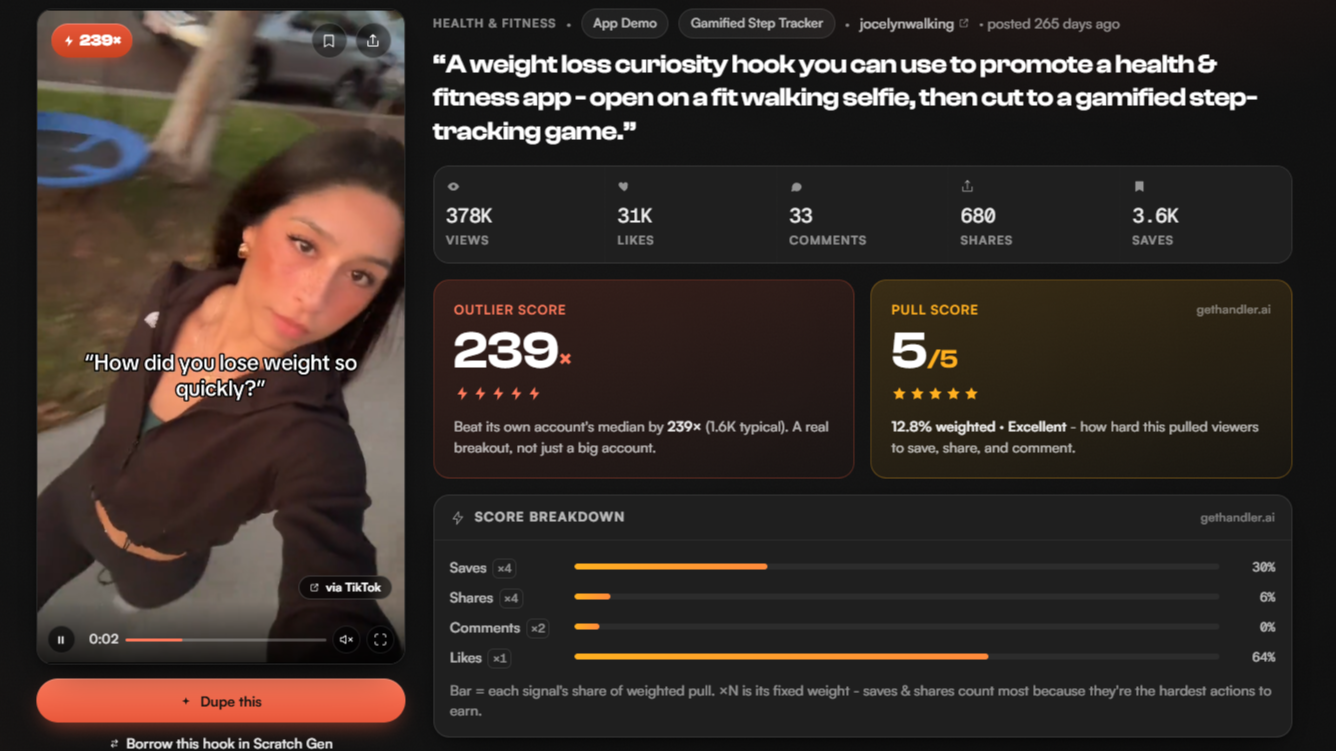
Step 1. The source's scores on its research page. The video itself is not shown.
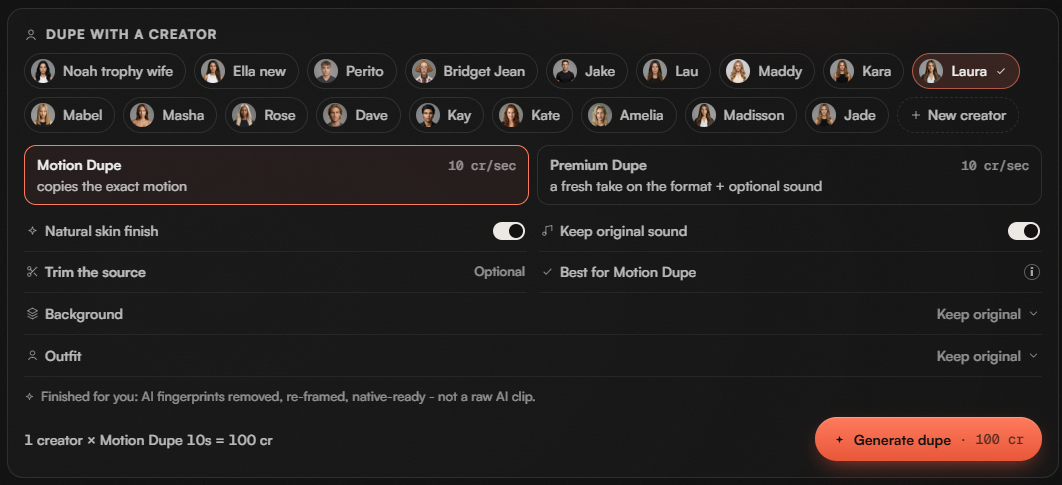
Steps 3 to 5. The creator row, the two style cards and the options. Credit figures are removed.
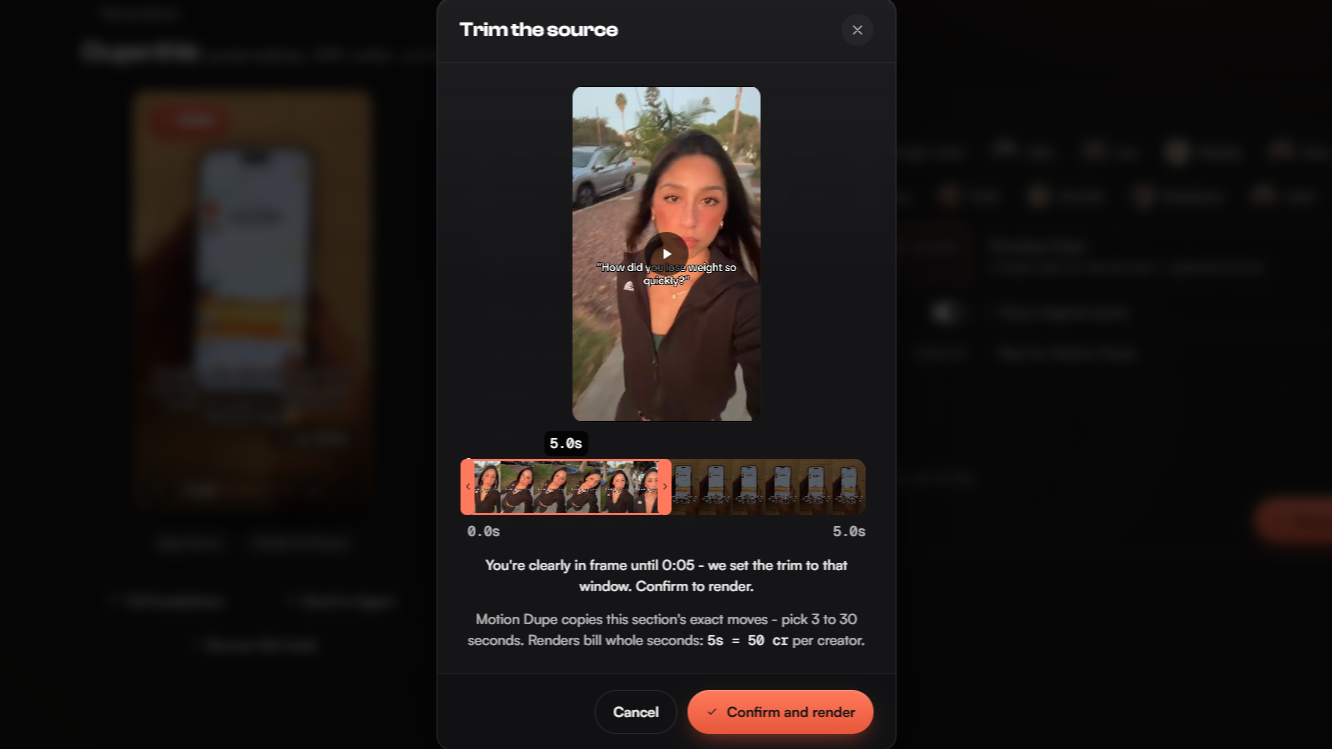
Step 6. The trim. The source preview is blurred.
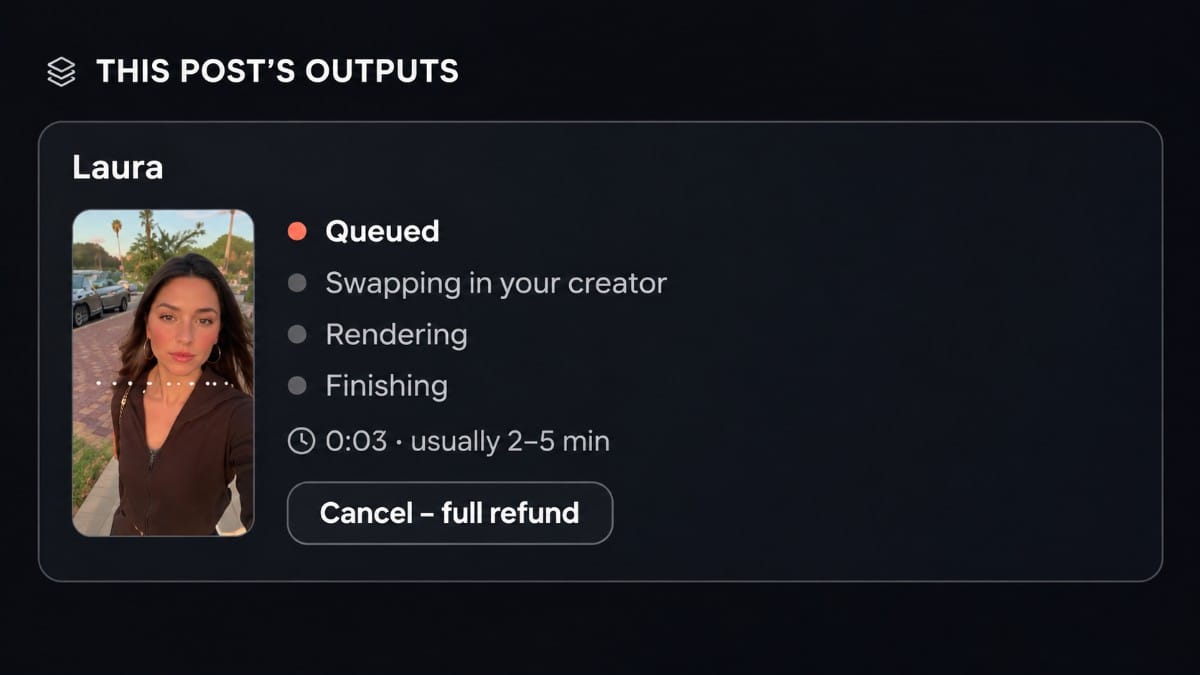
Step 7. The output card while it renders, with the source thumbnail blurred.
Run summary | |
|---|---|
Source | Health & Fitness outlier, 239x, Pull 5/5 |
Brand | an app-blocking app [CONFIRM: name it or keep it generic] |
AI creator | Laura |
Style | Motion Dupe |
Trim | 0.0 to 5.0 s |
Output | 5-second video |
The motion came from a fitness post, but the words did not. The kit was written for the app-blocking brand, not for the step-tracking topic of the source.
What does the finished dupe come with?
An overlay kit, headed "Overlay kit - add these in TikTok". The video is the render. The words are a separate layer, so you add the text overlay and caption when you post.
Our kit offered three angles, each with its own text overlay and caption, and a Copy all button on each:
Angle | Text overlay | Caption |
|---|---|---|
Hook | me taking my evening walk instead of losing 3 hours to my couch | breaking the subconscious reach changed everything #screentime #eveningroutine #focus |
POV | POV: you finally stopped bypassing your own screen time limits | putting friction right at the moment of the impulse reach was the only fix #dopaminedetox #screentime #dailyhabits |
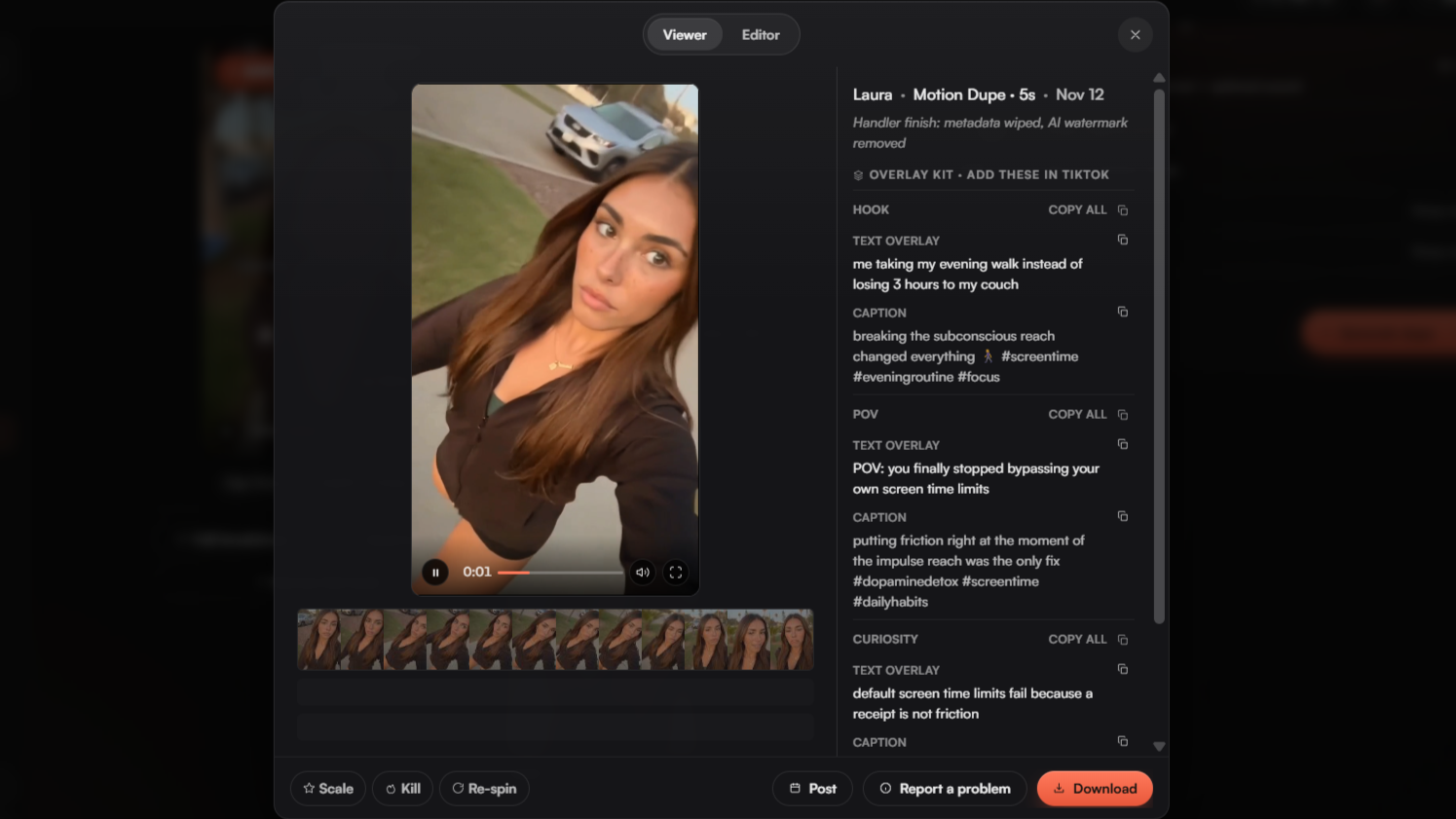
The finished dupe in the viewer, with the overlay kit to add in TikTok.
A third angle, Curiosity, opened with "default screen time limits fail because a receipt is not friction".
Treat the kit as a draft. Read every line before you post. A phrase like "the only fix" is a strong claim, so soften it if you cannot back it up. In a regulated niche such as finance, run the whole kit through the claim check from our finance post.
Motion Dupe or Premium Dupe: which should you pick?
Pick a Motion Dupe when the source's movement is the point. Pick a Premium Dupe when you want your own take on the format.
Motion Dupe | Premium Dupe | |
|---|---|---|
What the card says | copies the exact motion | a fresh take on the format + optional sound |
Best when | the moves carry the post, such as a selfie or a gesture | the idea carries the post and the exact shot does not |
Trim | pick 3 to 30 seconds of the source | |
What we ran | yes, 5 seconds | not run for this post |
Our run was a Motion Dupe because the source was a single walking selfie, and the moves were what made it work. The screen also offers a Keep original sound switch beside the style cards, marked "Best for Motion Dupe".
Do dupes work on slideshows too?
Yes. When the source is a slideshow or a single image, the Dupe this screen works slide by slide instead of by section. Each slide gets one of these actions:
- Swap puts your creator in the slide.
- Mutate remakes the slide for your brand.
- Skip leaves the slide out.
Background and Outfit stay on Keep original unless you change them. Each run adds an output under "This post's outputs", labeled with the creator and the type, Image or Slideshow. On one single-image source we ran four dupes with three creators, and all four sit side by side. The images are shown after this section.
Mutate is a slide action here. It is not the same as the Kill, Mutate or Scale decision you make about a whole post after it has run.
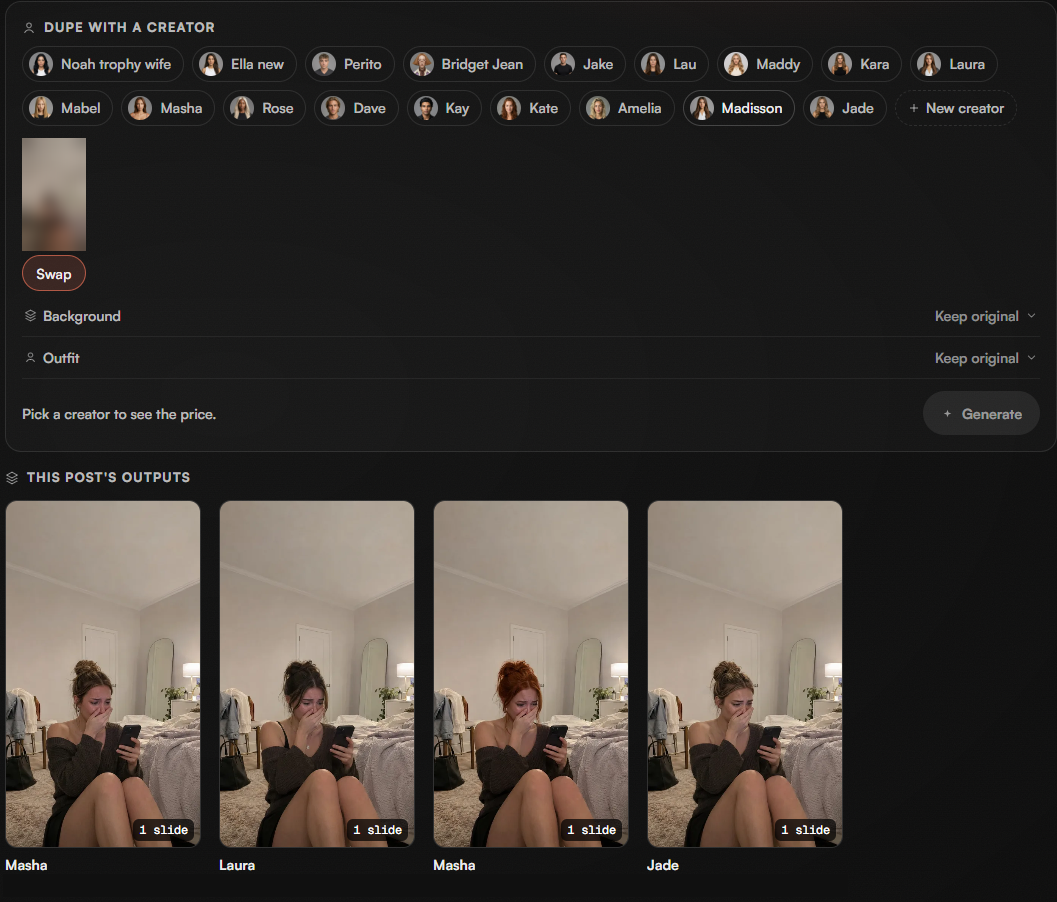
One single-image source, dupes made with different creators. The source thumbnail is blurred.
What do you do after the dupe is ready?
Three things, in this order.
- Read it against your rules. Check the clip and every line of the kit. For finance and other regulated niches, use the checklist in How Finance Apps Grow on TikTok Without Risky Claims.
- Label it. Mark every AI creator video as AI-generated when you post it. Can an AI Creator Front Your Fitness App's TikToks? covers TikTok's label and why we suggest labeling every video.
- Post it, or download it. The viewer has Post and Download buttons.
Then let the post run and judge it against your account's usual views. The viewer's Scale, Kill and Re-spin buttons are that decision. Wait until the post has finished its run first: Handler's outlier calculator says to skip videos under 10,000 views or under two days old. For how to read the result, see Kill, Mutate or Scale: How to Read Your Finance App TikToks.
What this does not cover
- It shows one run from one source. It is not a promise about any other post.
- We did not post the dupe or measure results, so it says nothing about views.
- We ran a Motion Dupe. We did not run a Premium Dupe for this post.
- We did not time the render. The screen said "usually 2-5 min".
- Credit costs vary by plan and clip length. See plans and pricing.
- The kit is a draft. You are responsible for every claim in what you post.
- It does not cover copyright or likeness questions. Rebuild the format, write your own words and do not use anyone's face without their consent.
How we measured
we ran one Motion Dupe in a Handler account and recorded each screen as it appeared. The source's scores come from its research page on that day: views, the account's typical views, Outlier, Pull and the score breakdown. The slideshow and image screens come from earlier runs on a second brand. We cropped the screenshots to the dupe panel, blurred the source video's faces and covered the credit figures and account details.
Try a dupe on your own app
Drop your app link into Handler and your first 6 picks are free, no card. Pick one, choose your AI creator and see the dupe screen for yourself. See plans and pricing for what renders need.
Related
- What Counts as a Winning TikTok for a Mobile Game?
- Can an AI Creator Front Your Fitness App's TikToks?
- How Finance Apps Grow on TikTok Without Risky Claims
- Kill, Mutate or Scale: How to Read Your Finance App TikToks
- The VSC Framework: How We Validate TikTok Ideas Before Building
- TikTok outlier calculator