Why Won't My TikTok Post? 9 Fixes That Work (2026)

Most failed TikTok posts come down to one of three things: a shaky upload connection, an app that is a few versions behind, or a video file that does not match TikTok's format requirements. If your post is stuck, silently failing, or bouncing back to drafts, work through the 9 fixes below in order. Most people find their answer in the first three.
Updated August 2026
TikTok's current upload requirements at a glance
Before troubleshooting, it helps to know what TikTok actually expects from an upload. A lot of "why won't my TikTok post" problems trace back to a video that quietly falls outside these limits.
| Spec | Current requirement |
|---|---|
| Supported file formats | MP4, MOV |
| Max file size | Up to 4GB |
| Recommended codec | H.264 |
| Recommended resolution | 1080 x 1920 (9:16 aspect ratio) |
If you are not sure your video matches these specs, our TikTok Size Guide shows the exact dimensions and export settings TikTok expects.
1. Check your connection, even if it looks fine
A weak connection does not always look weak. Texts send fine, your feed loads fine, and everything seems normal, but video uploads need a level of stability that casual scrolling does not require. If a post is stuck at "uploading" or failing silently, connection issues are the most common and the easiest first thing to rule out.
What to try:
- Switch networks. Move from Wi-Fi to cellular, or cellular to Wi-Fi.
- Turn Airplane Mode on for a few seconds, then off. This forces your phone to reconnect from scratch.
- Try posting a short, low-resolution clip first. If that goes through and your real video does not, you have learned it is likely a size or connection issue, not an account problem.
2. Update the TikTok app
If your app is more than two or three versions behind, posting problems become noticeably more common. Older versions can carry bugs that were already fixed, or they may not support the current upload pipeline TikTok is running on the backend.
What to try:
- Open the App Store or Google Play and check for a TikTok update.
- After updating, fully close the app, not just minimize it, and reopen it before trying to post again.
3. Fix video format and codec issues
Sometimes a video looks completely normal on your phone but was exported by third party editing software in a format TikTok cannot process cleanly. In these cases, the upload can appear to complete, but the video quietly fails to render or publish.
What to try:
- Export as H.264 MP4 at 1080 x 1920.
- If your editing app has a "social media" or "TikTok/Instagram" export preset, use it instead of a custom export.
- Check your export settings against the spec table above before re-uploading.
4. Reduce your file size or length
Large files, especially over 500MB, can time out mid-upload on mobile data or a weak Wi-Fi signal, even when the file is technically under TikTok's 4GB limit.
What to try:
- Trim unnecessary length before exporting.
- Compress the file using your editing app's export settings rather than relying on TikTok's in-app compression.
- If you are unsure your file is the problem, upload a short test clip on the same connection to isolate it.
5. Restart your device, not just the app
Closing TikTok from your app switcher helps, but it does not always clear whatever caused the post to fail. A full device restart clears background processes and memory states that a simple app close does not touch.
What to try:
- Fully power off your phone, wait a few seconds, then turn it back on.
- Reopen TikTok and try the same post again before making any other changes.
6. Clear TikTok's cache
Clearing the app's cache is one of the least destructive troubleshooting steps you can take. It is not the same as deleting the app or losing your account, drafts, or login.
What to try:
- On Android: Settings, then Apps, then TikTok, then Storage, then Clear Cache.
- On iPhone, TikTok does not offer a direct cache clear, so offloading and reinstalling the app, without deleting it, achieves a similar result.
7. Check for a community guidelines flag
Some videos get silently flagged before they ever fully publish, without a clear on-screen explanation. This can happen because of specific sounds, certain text overlays, or content that trips an automated filter, even when nothing about the video looks like a violation to you.
What to try:
- Check Settings and Privacy, then Account, then the Community Guidelines section for any recent warnings.
- Try re-uploading with a different sound and without any text overlay to isolate what triggered it.
- If a specific sound seems to be the issue, swap it for a different track from TikTok's own sound library.
8. Check if your posting privileges were restricted
This one is harder to catch because it does not always come with an obvious notification. If your account has been temporarily restricted, TikTok can block new posts entirely while everything else in the app still works normally.
What to try:
- Check Settings and Privacy, then Account, for any posting restriction notices.
- Review whether the account has any past strikes or violations attached to it.
- If your account shows an "Under Review" status, see [TikTok "Under Review": What It Means and What to Do] for what that status means and how long it typically lasts.
9. Rule out a platform wide issue
Sometimes it really is not you. TikTok occasionally rolls out backend updates that cause posts to publish but sit at very low views for a period, or that cause temporary upload failures across a large number of accounts at once. If none of the fixes above changed anything, especially if the problem started suddenly and affects more than one account you use, this is worth considering.
What to try:
- Check TikTok's official support channels for any acknowledged outage.
- Wait a few hours and try posting again before assuming it is an account specific problem.
- If your post does eventually publish but stays stuck at very low views, see [Why Is My TikTok Getting 0 Views?] for what to check next.
Still stuck? Use this decision tree
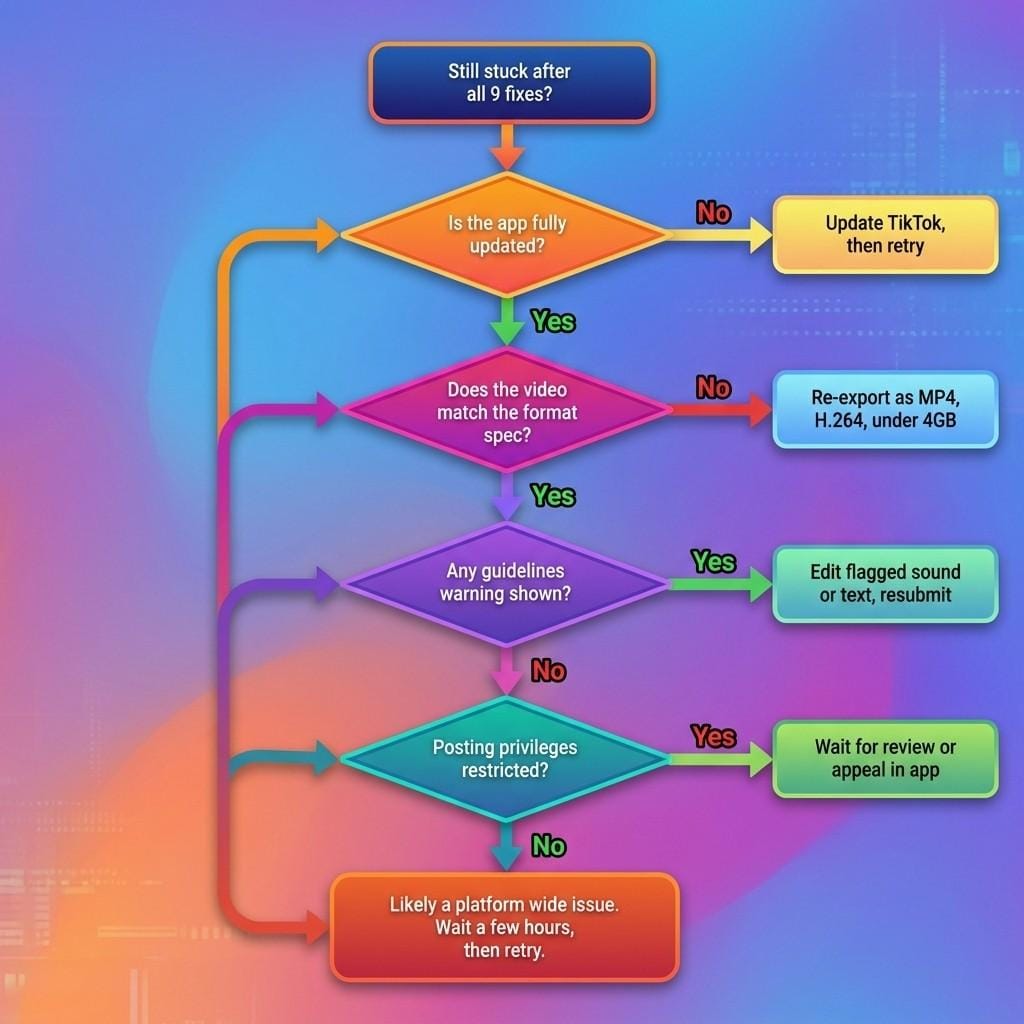
If you have gone through all 9 fixes and your post still will not go through, use the flow below to narrow down what is actually happening.
Quick answers
Does TikTok limit how many times you can post in a day? There is no official public limit on daily posts, but posting an unusually high volume in a short window can trigger extra scrutiny on a new or already flagged account. If you would rather plan a steady cadence than guess, our TikTok Posting Schedule Generator can build one around your goals.
Why does my TikTok get stuck on "processing" and never finish? This is most often a connection or file size issue rather than a content problem. Start with fix 1 and fix 4 above.
Can a weak Wi-Fi connection really cause a post to fail even if everything else works? Yes. Video uploads require more sustained stability than everyday scrolling or messaging, so a connection that feels fine for the rest of the app can still cause an upload to fail.
Before you post again
Once your post actually goes through, the harder question is usually not "did it publish" but "is it good." If you want to see what is already working in your niche before you post again, check out real examples with the numbers behind them at our outlier library.