
How to See When a TikTok Was Posted
For an exact date and time, TikTok's own interface will not give you one, but the timestamp is actually encoded in the video's URL itself, and a free tool can decode it in seconds.


TikTok shows a rough post date, either a relative time like "3d ago" or a plain date, directly on the video or on the creator's profile. For an exact date and time, TikTok's own interface will not give you one, but the timestamp is actually encoded in the video's URL itself, and a free tool can decode it in seconds.
Updated September 2026
What TikTok shows you, and what it doesn't
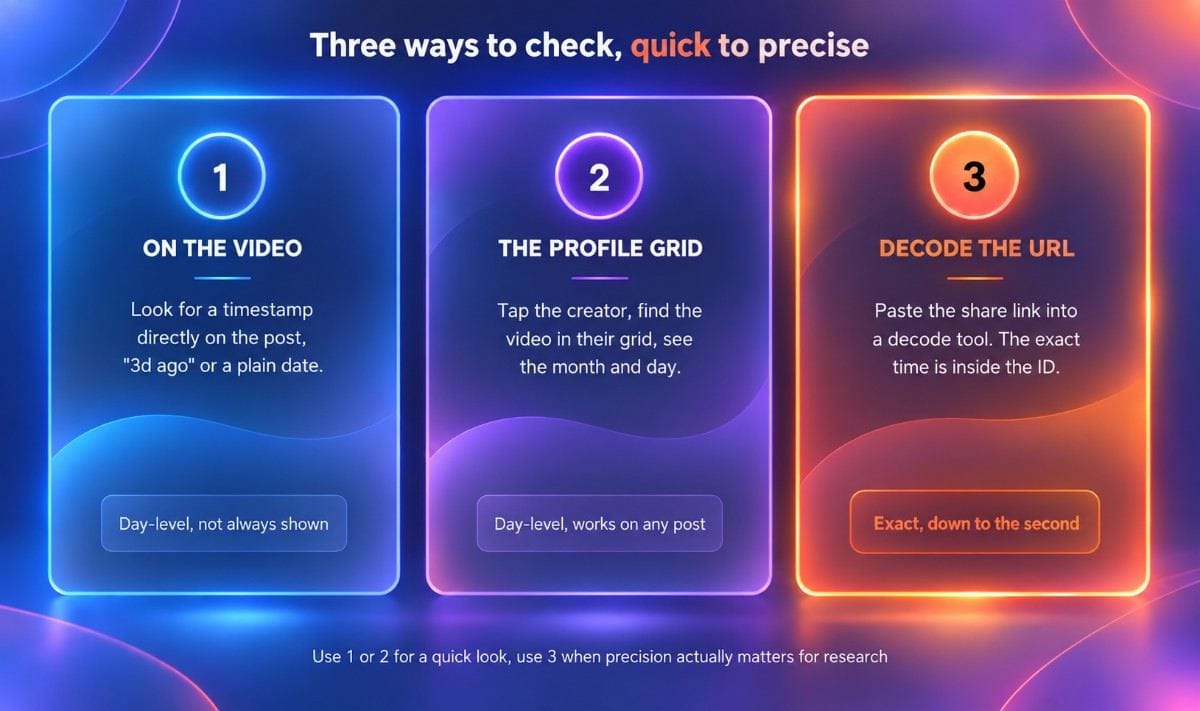
| Method | What you get | Precision |
|---|---|---|
| Timestamp on the video itself | A relative time or a plain date | Day-level at best, not always visible |
| Creator's profile grid | The month and day it was uploaded | Day-level, no time |
| URL decode | The exact date and time, down to the second | Exact |
The quick way: check the video or the profile
The fastest check is looking directly at the post. TikTok sometimes shows a timestamp right on the video, either a relative time like "3d ago" or a plain date such as "Dec 6, 2025." This works often enough to be worth checking first, but it is not consistently visible across every video, depending on how the post was made and where you are viewing it from.
If nothing shows on the post itself, tap the creator's username to open their profile, then find the same video in their grid. TikTok displays the month and day it was uploaded there, though still without an exact time. This method works for any public account and does not depend on the video showing a timestamp anywhere else.
The precise way: decode it from the URL
Every TikTok video URL contains its own upload time, whether TikTok's interface shows it or not. TikTok video IDs are Snowflake-style identifiers, a single large number whose first 32 bits encode a Unix timestamp. Shift that number right by 32 bits and you get the exact second the video was posted, which is more precise than anything visible anywhere in the app itself.
You do not need to do this math by hand. Copy the video's share link, tap Share and then Copy Link on mobile, or grab the URL straight from your browser's address bar on desktop, and paste it into a free TikTok date decode tool. The result comes back with the exact date and time pulled directly out of the link. Nothing gets fetched from TikTok's servers in the process, and the video does not even need to still exist for the decode to work, since the timestamp lives in the URL itself, not in TikTok's database.
Why post date actually matters for research
A view count on its own does not tell you much without knowing how long it took to get there. A video with 500K views posted yesterday and one with 500K views posted eight months ago represent two completely different signals. One is an active breakout worth studying right now, and the other may have built up slowly over time and could already be losing momentum by the time you find it.
Post date is also how you tell an original from a copy. If you are studying a format that looks familiar, checking which version actually posted first tells you who originated it and who is following the trend rather than setting it. Handler's TikTok Outlier Calculator factors in how fast a post accumulated views relative to an account's own baseline, so knowing the real post date is part of judging whether a number is genuinely impressive or simply old.
Turning a fresh find into your own post
Once you have confirmed a video is genuinely recent and worth studying, the next step is adapting the pattern rather than the specific execution. The VSC Framework: How We Validate TikTok Ideas Before Building covers how we decide which patterns are actually worth modeling, and Handler's AI TikTok Video Idea Generator can help turn one into a concept for your own app. For a running list of real, dated examples already broken down this way, see What to Post on TikTok: 27 Ideas for App Makers.
Three ways to check, side by side
Quick answers
Can you see the exact time a TikTok was posted, not just the date? Not directly in the app. TikTok's interface shows a relative time or a plain date at best. The exact time, down to the second, is encoded in the video's URL and needs a decode tool to extract it.
Does TikTok show the post date on every video? Not consistently. Some videos display a timestamp directly on the post, while others only show the date if you check the creator's profile grid instead. The URL decode method works on any public video regardless of what the app itself displays.
Why would you need to know exactly when a TikTok was posted? Mainly for research. A view count means very little without knowing how long it took to accumulate, and the exact post date is how you tell a genuinely fresh breakout from an old post that has been circulating for months.
Written by the Handler Team