How to Find Winning TikToks in Your Niche (for App Makers)
Raw view counts will mislead you, because a big account's average post looks like a hit while a small account's real breakout looks like nothing.
To find winning TikToks in your niche, look for posts that got at least 10x the views their own account normally gets, then check that viewers saved and shared them instead of only liking them. Raw view counts will mislead you, because a big account's average post looks like a hit while a small account's real breakout looks like nothing.
That's the whole method in two sentences. The rest of this post is how to actually do it by hand, what it looks like on five real posts, and where it gets slow enough that you'll want a tool.
I grew Flamme to 50M+ organic views before it was acquired by Arya, and the single habit that mattered most was studying posts that had already broken out in our niche before making anything.
Why view counts lie
A million views on an account that always does a million is a normal Tuesday. It tells you nothing about the format. Thirty thousand views on an account that usually gets a thousand is a real signal, because something about that specific post made TikTok push it far past its usual audience.
So the number you want is views divided by the account's normal views. I call it the Outlier Score. You can run it on any post with the free TikTok outlier calculator.
The second number is whether people did anything after watching. Likes are cheap. Saves and shares are the actions that carry a post into more feeds, and a save means someone plans to come back. For app makers that matters a lot, because a saved video about an app is often a download that happens later.
The manual method, step by step
You can do all of this with a TikTok account, a spreadsheet and some patience. No paid tool needed.
1. Build a list of 20-30 accounts in your niche
Search TikTok for the problem your app solves, not your category name. "Calorie tracking app" gets you ads. "How I lost 10kg without a trainer" gets you the creators your users actually watch. Also search your competitors' app names and note every account that posts about them, including tiny ones. Small accounts are where the cleanest outliers hide.
2. Work out each account's baseline
Open the profile, skip pinned posts, and write down the views on the last 10 regular posts. Take the median, not the average. One viral post drags an average way up and hides everything else.
3. Score every post against that baseline
Divide each post's views by the median. My rules of thumb are that 10x is a strong outlier and 100x is a monster. I also skip anything under 10,000 views, because at tiny numbers a few shares from friends can fake a big multiple.
4. Check the Pull
For every post that passes step 3, add up this weighted total and divide it by views:
(shares x 4) + (saves x 4) + (comments x 2) + likes
That's the same weighting Handler uses for its Pull Score. Shares and saves count four times as much as a like, comments twice. A post with a high multiple and a weak Pull got pushed but didn't land. A post with both is the one to study.
5. Throw out what you can't use
Keep a post only if you could make your own version of it. Is the app or the problem on screen? Is the format something you can actually produce, like a screen recording, a slideshow or a silent clip with text? A celebrity cameo or a dance trend won't transfer to your app, however big it got.
6. Break down the survivors
For each keeper, write down four things:
- What happens in the first two seconds.
- How many beats the video has.
- Where the product shows up.
- What the top comments are asking for.
The comments are underrated. If half of them say "what app is this", the format sells.
7. Log it and look for repeats
Put everything in a sheet with columns for account, views, baseline, multiple, Pull, format and hook. After 30-50 posts, formats start to cluster. That cluster is your content plan.
8. Make your version
Keep the structure: the hook type, the number of beats, where the product lands. Change everything specific: your app, your wording, your creator. You're copying a format, not a video.
Five real outliers, and what each one teaches
I pulled these from Handler's public outlier library on October 01, 2026. Every number below is on the linked page, and the counts keep moving as the posts keep getting views.
Mise Meal Planner: 8,290x, the save magnet
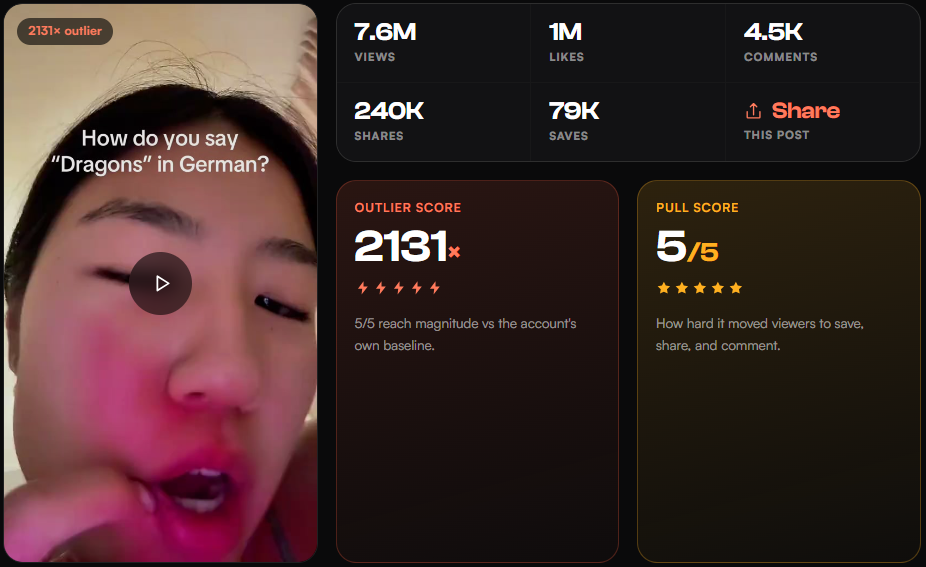
@carla.eatsss's Mise Meal Planner demo did 6.5M views on an account whose normal post gets about 784. It opens on a crying face and "No way", then turns into a click-by-click demo of the app's budget slider. It picked up 196K saves and 173K shares against 491K likes, which is a Pull of 5/5. When saves nearly match half your likes, people are bookmarking the app to try later.
A translation app: 2,131x, the shareable demo
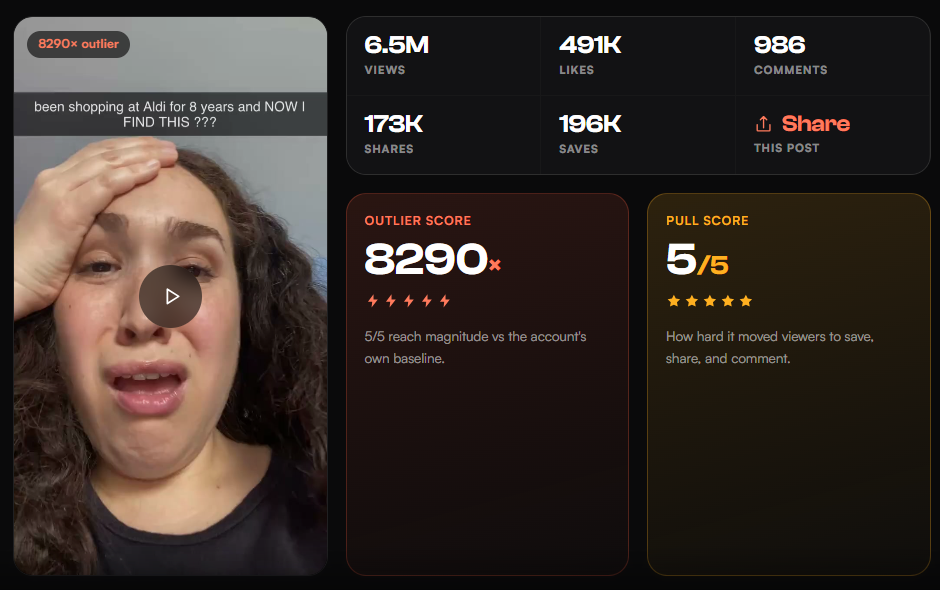
This language learning demo from @russianpatrol reached 7.6M views against a normal 3.6K. A creator asks how to say simple words, the app answers in a loud voiceover, and it builds across about 23 seconds to one long tongue-twister made from those words. It got 240K shares. The app is on screen the entire time, which is the part most app makers get wrong: they cut away from the product to look more "native" and lose the reason anyone would download.
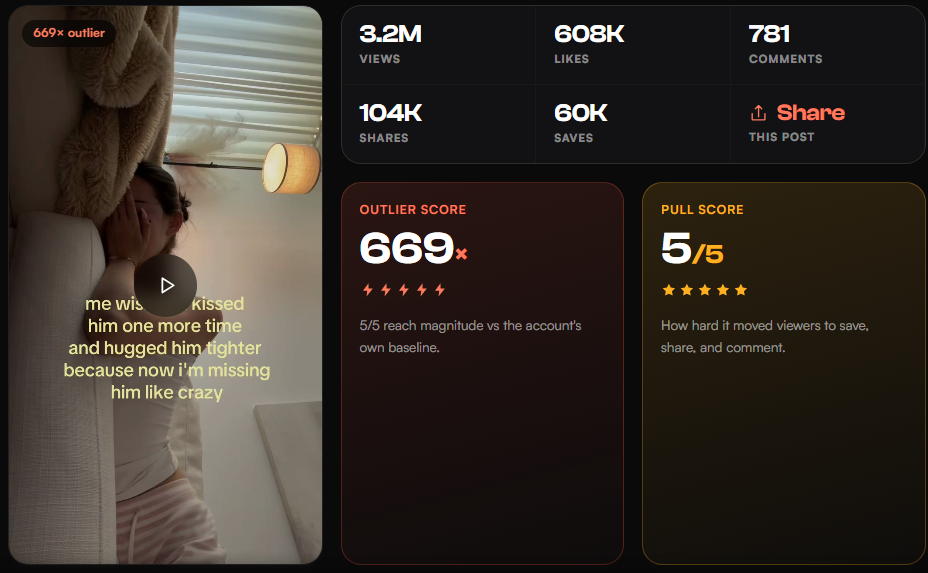
A couples widget app: 669x, the silent format
@bella.longdistance's widget post is 12 seconds, two beats and no spoken audio. A sad long-distance text overlay, then the home-screen widget in use. 3.2M views on an account with a median around 4.8K, and 104K shares. If you're scared of being on camera, this is proof you don't have to be. Silent UGC is the most common breakout format among the lifestyle outliers in the library right now, at 37% of them.
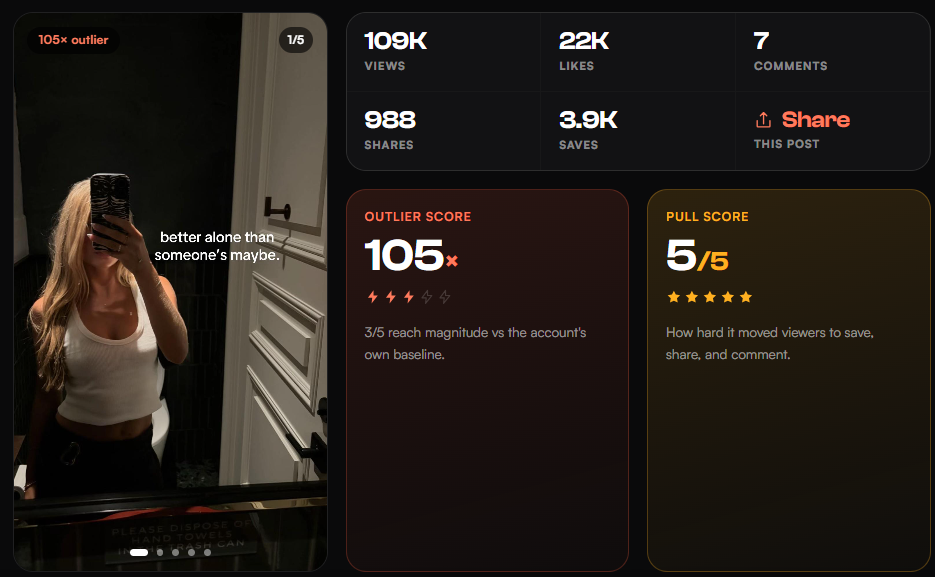
A calorie tracker: 105x, small views and huge Pull
This slideshow from @linaafitness only has 109K views. But the account usually gets about 1K, and the post drew 3.9K saves and 988 shares on 22K likes, a weighted Pull of 37.7%. It layers breakup realizations over gym clips and ends on a screenshot of the tracking app. On raw views it would never make your list. On Outlier and Pull it's one of the most useful posts in the health and fitness set.
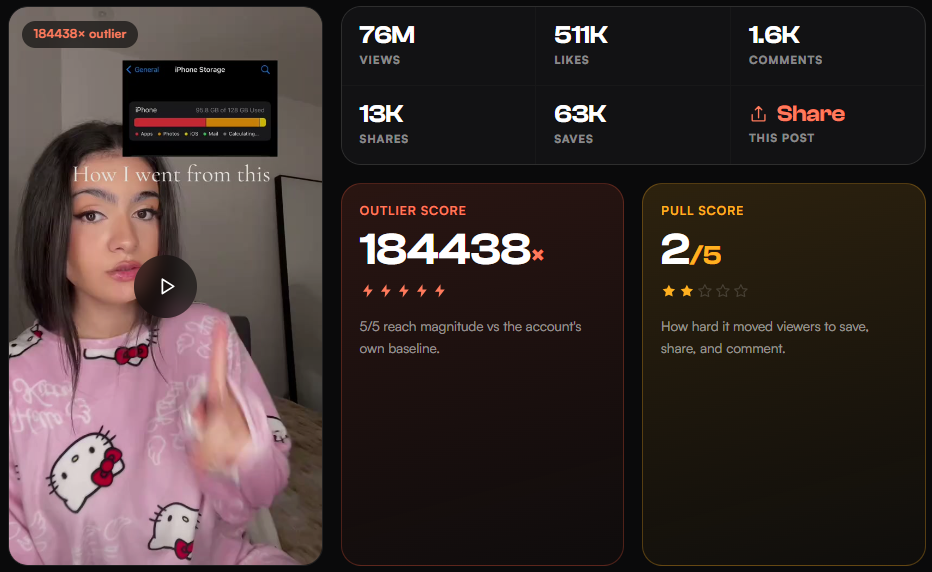
Swipewipe: 184,438x, the one to be careful with
@denisa.m0227's storage cleaning post hit 76M views on an account that normally gets about 411. That multiple is absurd, and it's a good lesson in reading the numbers together. The Pull is only 2/5: 63K saves and 13K shares against 511K likes, 1.1% weighted. Huge reach, mostly passive watching. The format (a full storage bar, then a swipe-to-delete recording) is still worth studying, but I'd make the calorie tracker's format first.
Where the manual method breaks
The method above works, and it's slow. Working out a baseline means scrolling every profile and writing down ten numbers. Doing that for 30 accounts is an evening, and a week later half your list is stale because TikTok moves fast.
It also misses things. You only find accounts you already thought to search for, and the best outliers in a niche often come from accounts with a few hundred followers that never show up in search.
And you can only see public stats. Watch time, completion rate and profile clicks stay private to the account owner, in any tool.
How Handler speeds it up
Handler runs the same method, so everything above still applies. It just does the counting for you.
- The free outlier library. The outlier library scores thousands of TikToks from app niches by Outlier and Pull, grouped by category, so you can skip steps 1 to 4 for common niches.
- The Chrome extension. It puts an Outlier badge on every thumbnail while you scroll a profile on TikTok, Instagram or YouTube, so step 2 goes from ten minutes to a glance.
- Picks that fit your app. Inside the app, you tell it your app and niche and it sends picks that fit you. The free 7-day trial gives you six a day with no card.
- The breakdown, written for you. For each pick it writes the breakdown from step 6: the hook, the beats, and what the comments want.
- Your version, made with your AI creator. Then it can make your version with an AI creator, with your app on screen. Renders and AI creators start on the Growth plan ($69 a month, three AI creators). Starter is $39 and Pro is $149. Those are monthly prices. Billed yearly, Starter, Growth and Pro work out to $29, $49 and $119 a month.
What it won't do
It can't see private stats either. Some niches have far fewer tracked posts than others, so if you're in something narrow you'll still do part of step 1 yourself. And a score is a record of what already happened, not a promise about your post. Your version of a 100x format can easily land at 2x. The hit rate beats guessing, and it's nowhere near 100%.
If you want to see how Handler compares with other research and AI UGC tools, the comparison guides lay them out by the job each one does best.
FAQ
What counts as a winning TikTok?
A post that got at least 10x its account's median views, with at least 10,000 views, and strong saves and shares relative to likes. The multiple shows TikTok pushed it. The saves and shares show people cared.
How many posts should I look at before making anything?
Aim for 30-50 scored posts in your niche. By then the same two or three formats usually keep showing up, and those are the ones to make first.
Should I use average or median views for the baseline?
Median. One viral post can double an account's average and hide every other outlier on the profile. Use the median of the last 10 regular posts and skip pinned ones.
Is copying a winning TikTok format allowed?
Copying a format, like a hook style, a structure or a silent before-and-after, is how most of TikTok works. Re-uploading someone's footage, audio you don't have rights to, or their exact script is not. Make a new video with your own app, words and creator.
Do I need a paid tool to find winning TikToks?
No. The steps above work with a free TikTok account and a spreadsheet, and the outlier library and outlier calculator are free. A tool saves time. It doesn't change the method.